How to Choose the Right Font for Your Instagram Posts
Your font says more than your words do.
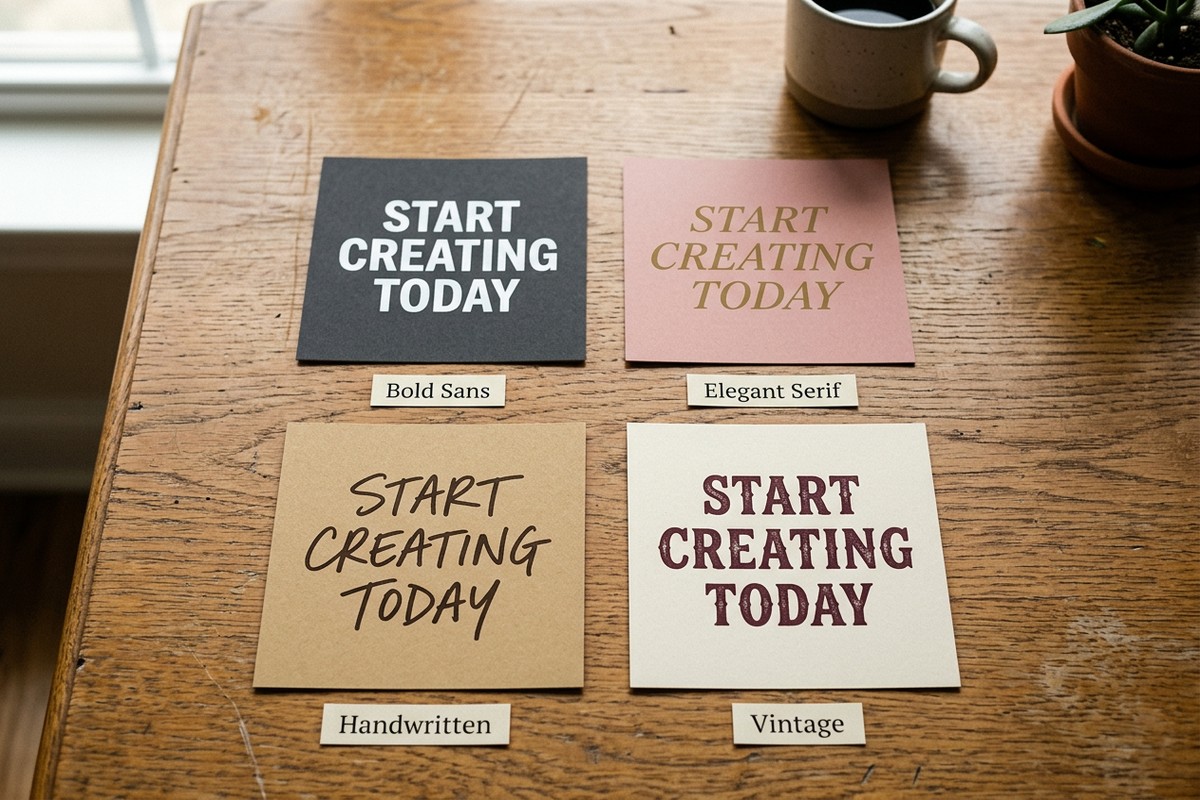
That might sound dramatic, but think about it. Before anyone reads your caption, before they process your message, they see the font. They feel it. A bold sans-serif screams confidence. A flowing script whispers elegance. A chunky hand-drawn typeface says fun and approachable.
If you’re posting on Instagram and not thinking about your font choice, you’re leaving engagement on the table. Here’s how to pick the right one every time.
Start with the Mood, Not the Font
The biggest mistake people make is browsing fonts randomly until something looks nice. That’s backwards. Instead, start with a question: what feeling do I want this post to create?
Are you announcing a sale? You want something bold and urgent. Sharing a motivational quote? Go for something clean and elegant. Promoting a cozy winter event? A handwritten or rustic style sets the tone.
Once you know the mood, the right font category becomes obvious.
The Four Font Families (and When to Use Each)
Serif fonts
Fonts with small strokes at the ends of letters. Think Playfair Display or Times New Roman. Serifs feel established, trustworthy, and polished. They’re perfect for quotes, educational content, and anything where you want to project authority. Fashion brands, book accounts, and lifestyle influencers love serifs.
Sans-serif fonts
Clean, modern, no extra strokes. Think Montserrat, Helvetica, or Futura. Sans-serifs feel contemporary and readable. They work well for announcements, product promos, business tips, and anything that needs to be processed quickly while scrolling.
Script and handwritten fonts
Flowing, cursive, or hand-drawn. These feel personal, warm, and creative. Great for invitations, personal stories, wedding content, and brands that want to feel approachable. Just make sure they’re readable at small sizes — a script font that looks beautiful on a poster can become illegible on a phone screen.
Display and decorative fonts
Bold, unusual, attention-grabbing. These are your headline fonts. Use them for one or two words max. They stop the scroll but they’re not meant for paragraphs. Perfect for sale announcements, event headers, or adding a punch of personality to a post.
Three Rules That Always Work
Keep it to two fonts max. One for your headline, one for body text. Mixing three or more fonts in a single post almost always looks cluttered. If you’re using Word Swag, the Typomatic engine handles this for you automatically by pairing complementary fonts in every layout.
Contrast is your friend. Pair a bold font with a thin one. A serif headline with a sans-serif subtitle. Contrast creates visual hierarchy, which means people’s eyes go where you want them to go: your main message first, supporting details second.
Test it at thumb size. Before you post, shrink your design down to the size it’ll appear in someone’s feed. Can you still read every word? If not, simplify. Instagram is a mobile-first platform. If your font doesn’t work at small sizes, it doesn’t work.
Want to explore different font styles? Browse our full font collection, including fancy fonts, scripts, and bold display styles.
What About 3D Fonts?
Here’s where things get interesting. Traditional fonts are flat. Every Instagram post uses the same Canva templates, the same Google Fonts, the same look. If you want to stand out, you need something different.
RealFonts in Word Swag lets you generate 3D text made from real-world materials — flowers, neon, rope, clouds, candy. Your words literally become art. No other app offers this, which means your posts will look unlike anything else in the feed.
The Fastest Way to Get Started
You don’t need to memorize font pairing rules or spend hours in a design tool. Word Swag’s Typomatic engine generates professionally designed font layouts with a single tap. Every time you tap, you get a new combination. Pick the one that matches your mood, customize the colors, and post.
That’s the whole process. Type your message, tap through styles, pick your favorite, share. Most people create a finished design in under a minute.
Download Word Swag free and try it yourself.